
Last updated: October 2026
Quick answer: There’s no magic number. A blog post should be as long as it takes to fully answer the reader’s question, and no longer. As a starting point, most helpful posts fall between 800 and 2,000 words, but a quick answer can be shorter and a deep guide can be much longer.
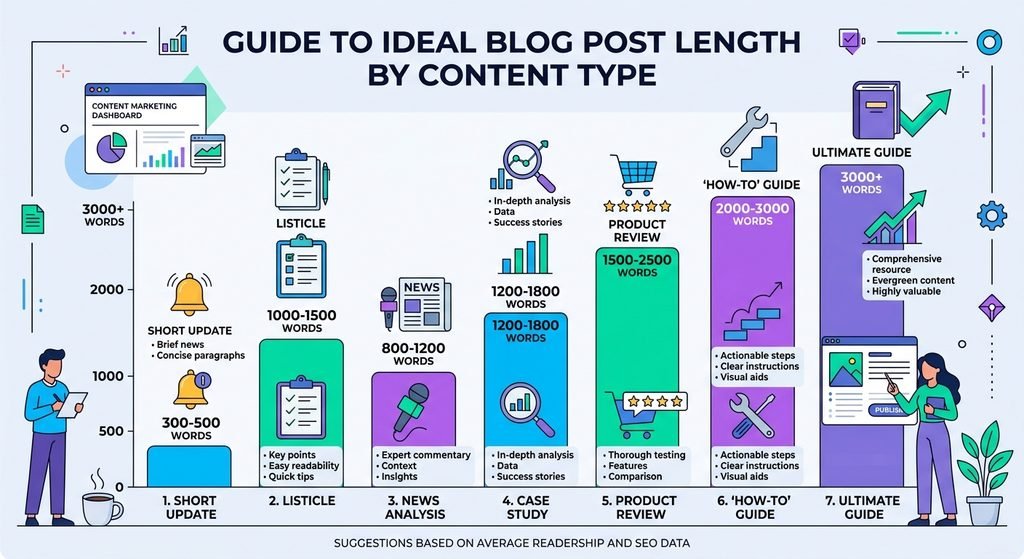
If you have ever searched for the “perfect” length for a blog post, you have likely come across answers ranging from 300 to 3,000 words—or even more. This can be confusing, but it points to a simple reality: the ideal length depends on what you are writing and who is reading it.
This guide explains what truly matters, provides reference ranges for common types of posts, and shows a simple way to determine the appropriate length for each post.
Does Word Count Affect SEO?
Short answer: not directly. Google has stated on many occasions that word count is not a ranking factor. What matters is whether your page satisfies the search query. However, in practice, length and quality are often linked; that is why this myth is so widespread.
Myths about long posts
- ‘Longer always ranks better.’ Not true. A 3,000-word post that wanders will lose to a clear 900-word post that answers the question.
- ‘Under 300 words is thin content.’ Not always. A short post can be perfect for a simple question. But a short post that says nothing new is a problem at any length.
- ‘You need exactly 1,500 words.’ There’s no such rule. Anyone who gives you one number for every post is guessing.
What Google actually rewards
Google aims to show pages that are useful, original, and written for people. In practice, this means your content should cover the topic comprehensively, address any follow-up questions a reader might have, and be easy to read. A thorough treatment of a subject often requires more words; consequently, long-form content and high-quality content frequently go hand in hand. However, word count is an outcome, not the goal.
Suggested Length by Post Type
Use these as starting points, not rules. They come from common practice, and you should always check the actual search results for your topic.
| Post type | Typical starting range |
| Quick answer or definition | 500 to 1,200 words |
| News or update | 300 to 800 words |
| How-to tutorial | 1,000 to 2,000 words |
| Listicle (’10 ways to…’) | 1,000 to 2,000 words |
| Product or tool review | 1,000 to 2,000 words |
| Comparison post | 1,200 to 2,500 words |
| Pillar or complete guide | 2,000 to 3,500+ words |
A conversion topic like ‘how many pages is 1000 words’ can be answered well in about 1,200 words. A topic like ‘how to start a podcast’ needs far more. The question decides the length.
How to Decide Your Length in 3 Steps
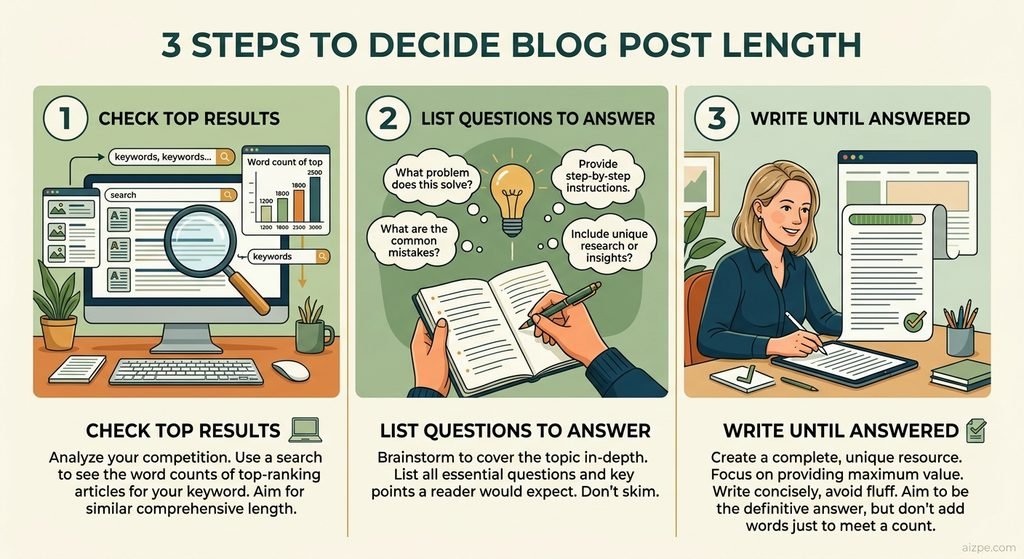
Step 1: Check the top results
Search for your keyword and open the first five results. Take note—roughly—of their length and the topics they cover. The goal is not to copy them, but to learn what readers are looking for.
Step 2: List the questions to answer
Note down all the questions a reader might have about the topic: the main question, follow-up questions, and common misconceptions. The “Other questions from users” box is a good source of ideas. Your outline is simply your list of answers.
Step 3: Write until the questions are answered
Draft the post. Once every question has a clear answer and you have nothing else useful to add, stop. If you are just adding words, trim them back. If you are leaving out questions, add them in.
How to Measure Your Word Count
Paste your finished draft into our free Word Counter to get the exact number of words, sentences and characters. It’s also a good way to spot sections that are far longer or shorter than the rest.
A few practical observations: headings, image captions, and the frequently asked questions (FAQ) section are included in the total word count. If you use a word-counting plugin, check whether it includes HTML code or “shortcodes,” as this can inflate the figure.
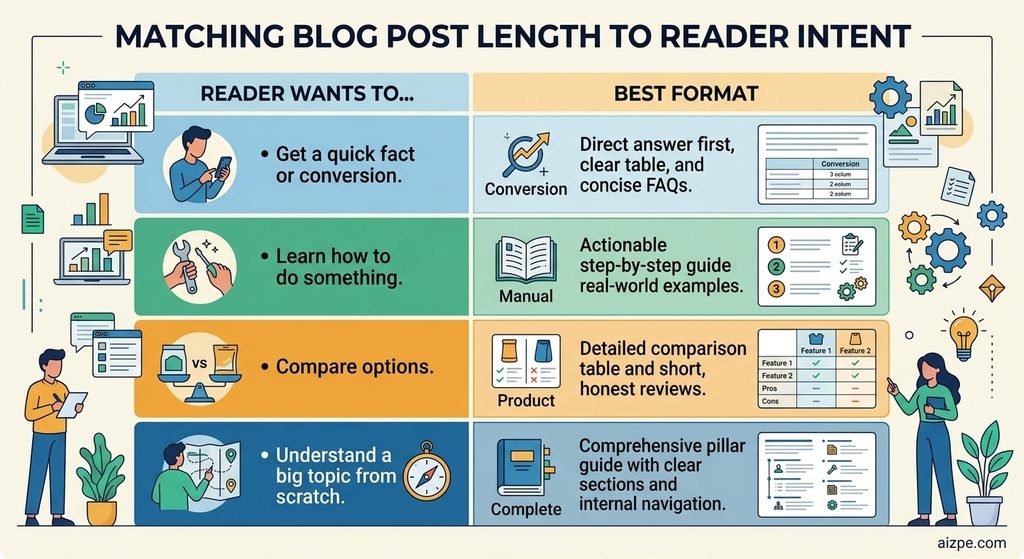
Match Length to Search Intent
The most useful question isn’t ‘how long?’ but ‘what is the reader trying to do?’. Different goals need different shapes.
| Reader wants to… | Best format |
| Get a quick fact or conversion | A direct answer, a table and a few FAQs |
| Learn how to do something | A step-by-step guide with examples |
| Compare options | A comparison table plus short reviews |
| Understand a big topic from scratch | A complete guide with clear sections |
| Read the latest update | A short, factual, dated post |
Use the length ranges above as habits, not rules. If the first five results are all 700-word answers, a 3,000-word post may feel like too much work for the reader.
A 5-Question Length Test
Before you publish, ask yourself:
- Does the first 100 words answer the main question?
- Do I cover the five most likely follow-up questions?
- Is there any paragraph I’d skip if I were the reader? If yes, cut it.
- Does every section add something new, such as a fact, an example or a step?
- Would a reader need to open another page to finish the job? If yes, what’s missing?
If you can answer yes, yes, no, yes, no, the length is right, whatever the word count says.
What Google and AdSense Expect
Google doesn’t publish a minimum word count. Its guidance on helpful content asks whether a page gives a complete, original description of the topic, adds something beyond what’s already out there, and leaves the reader satisfied. Those are quality tests, not length tests.
The same principle applies to AdSense. Google evaluates the site as a whole. Pages with thin content, copied or rewritten text, or those created solely to display ads are common grounds for rejection. A site with fewer, yet genuinely useful, articles is in a better position than one containing many brief, empty posts. Including pages with clear policies—such as “About,” “Contact,” or “Privacy”—helps build trust, but it is no substitute for high-quality content.
Writing for Google and AI Answer Engines
More people now get answers from AI summaries and chat tools, not only from a list of links. You don’t need a special trick for that, because clear writing does the job:
- Answer first. Put a one or two sentence answer under the heading.
- Use question headings. ‘How many words should a blog post be?’ matches how people ask.
- Define terms briefly. One plain sentence beats a paragraph of background.
- Use tables and lists for comparisons and steps.
- Add an FAQ with real follow-up questions.
- Be honest about limits. Say ‘it depends’ and then explain what it depends on.
These habits also make a post easier for people to skim, which is the main goal.
Three Examples of Length Matching the Topic
‘How many pages is 1000 words’. The reader wants a number and a table. A clear 1,200-word answer that covers edge cases such as fonts and MLA format is complete.
‘How to start a blog’. The reader is starting from zero and needs many steps: niche, platform, hosting, first post. A 2,500-word guide is reasonable, and splitting it into sections helps.
‘Best budget laptops’. Length matters less than freshness and honesty. A comparison table, short reviews and a visible update date beat a long essay.
Common Mistakes
- Padding. Repeating yourself to reach a number makes the post worse, and readers leave.
- Copying the outline of the top result. Use it to learn what readers expect, then add your own examples and answers.
- Using one length for every post. A quick answer and a complete guide need different treatment.
- Ignoring mobile reading. Many people read on phones, so short paragraphs and clear headings matter.
- Never updating. An old post with outdated numbers is a problem at any length.
FAQs
Is 500 words enough for a blog post?
For a simple question or a quick update, yes. For a competitive topic where other pages go deep, probably not. Always compare with what’s already ranking.
Is a 2,000-word blog post too long?
Not if every section helps the reader. Break it up with clear headings, short paragraphs and a table of contents so people can find what they need.
Should I make old posts longer?
Only if they’re missing useful information. Updating a post with fresh examples, corrected facts or new questions helps. Adding filler doesn’t.
Do images count in word count?
No, only text counts. But alt text and captions are text, so some tools may count them.
What is the minimum word count for AdSense approval?
There’s no official minimum. Google looks at whether your content is original, useful and complete. Many sites focus on quality first and then build up the number of articles.
Do longer posts earn more AdSense money?
Not automatically. Revenue depends on traffic, reader attention and ad placement. A longer post can hold attention longer, but only if the content is worth reading.
How often should I update old posts?
Check important posts every few months. Fix numbers that have changed, add new questions people are asking, and update the date only when you’ve really changed something.
Final Thoughts
Stop chasing a magic number. Check what readers expect for your topic, answer their questions fully, and stop when you’re done. When you want to see where you stand, use our free Word Counter.
Related reading: Essay Word Count Checker | Reading Time Calculator